Innovation Feud: a game-show review built from my students' own answers
I ask 180 students a question in Top Hat, group their answers, and turn the results into a game-show board we play on the projector.
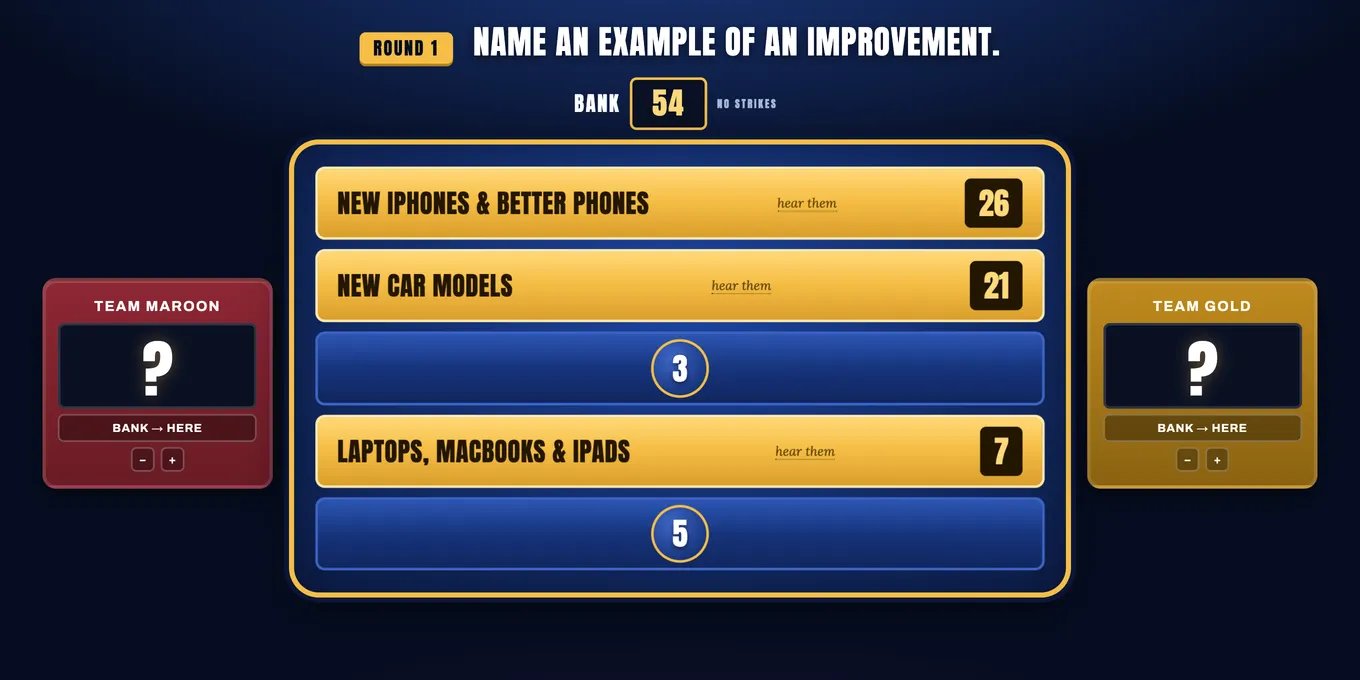
MGT 3360, Studies in Entrepreneurship, is a big lecture with about 180 students. I wanted a way to bring exit-ticket questions back into later classes, so students could see a purpose in those small assignments.
How it works in class
At the end of class, I ask a few quick questions in Top Hat as exit tickets, like “Name an example of an invention” or “Name a product that has become irrelevant.” Everyone answers. After class, I group the answers into themes and count how many students landed on each one. Those counts become the points on the board, and we play it a class or two later.
As a way of breaking up the class lecture, we play it like the TV game show. Two teams are called up and take turns guessing the top answers. I’ve improved the gameplay over time, but the goal stays the same: students see how their answers compare to their classmates’, it sparks discussion, and it’s a little more fun.
A few parts make it more than a quiz:
- Real quotes. Click a revealed answer and it shows a few of the actual responses behind it, with no names attached.
- The blooper reel. The best off-the-wall answers get their own round of flip cards. Yes, someone named Toaster Strudel as an invention.
- Same product, different answer. Some items showed up under more than one question. Tesla was called an invention, an innovation, and an improvement by different students. That screen sets up the real discussion: the lines between those ideas are blurrier than the textbook makes them look.
The game runs from my laptop on the projector, with sound effects, flipping tiles, and confetti for the winner. A printable host sheet keeps the answers, point totals, and a judging guide in front of me, so I can rule on close calls fast.
How I built it
The first version was an exit-ticket review game in week 4. Since then, I’ve used it as a template. Each new game starts from the same file, and I give Claude Code the new questions, the grouped answers, and a list of everything that already works and shouldn’t change. This semester, that template turned into an innovation game, a brand game, and a marketing game.
Play it
Game 2 is online, with my class’s real answers to “Name an improvement” and “Name a product or business that has become irrelevant.” It’s built for a projector, so it plays best on a laptop or bigger screen. Click Play Round 1, press 1 through 5 to reveal answers, and press X for a strike. Click “hear them” on any revealed answer to see what students actually wrote.